
Skip to content
Get your checkup

For online store owners

When did you last take your store in for a checkup?

If the answer is “never”, you're not alone. Here's how to check it yourself, in an hour or two, and end up with results in black and white: what's healthy, what needs fixing and where to start.

Get your checkup · $39

If your results come back clean, we refund you.

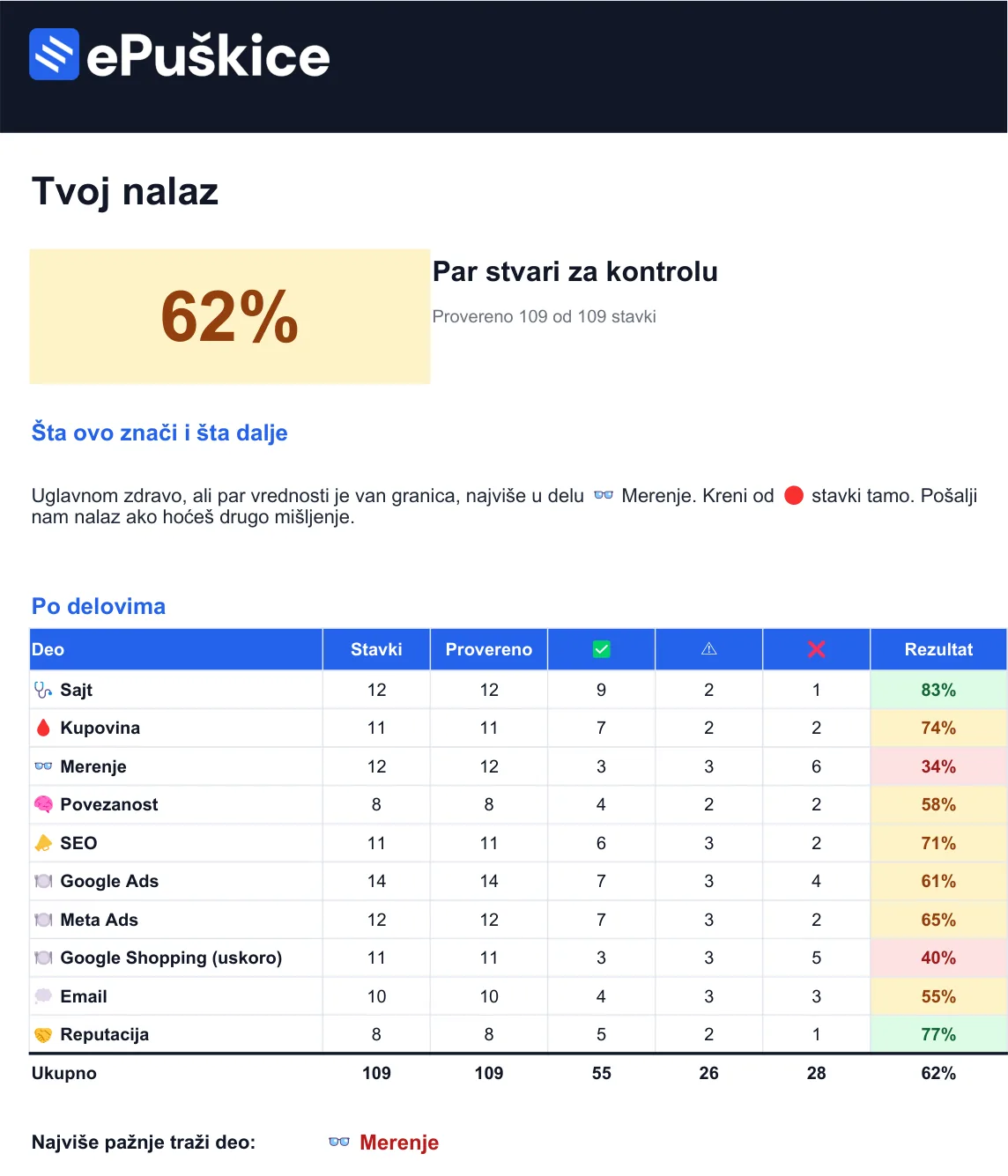
Your resultsSample
62%A few things to watch
Website
83
Checkout
74
Tracking
34
Google Ads
61

Start with: Tracking, red items first

you get this in an hour or two

8store organs
1-2 hand you have results
$39one time
100%money back if everything is healthy
Hi, Steph here, from Bizz Cheatsheets.Google and Meta ads

Let me take a guess at what your month looks like.

Your ads are running, on Google and on Instagram. Money is going out. Orders are coming in, just not as many as that money should bring.

The agency, or the guy who runs your ads, sends a report full of numbers that sound good. Reach. Impressions. Clicks. And your bank account looks the same as last month.

You ask your developer if everything's OK with the site. They say “it all works”. You nod. What else can you do, you have no way to check.

And somewhere around midnight, scrolling through orders on your phone, you wonder: is the problem the ads, the site, or (the worst one) me?

Here's the good news. Most of the time, it's NOT you.

The problem is that nobody ever gave you a list of what to check. Everyone sells you something new. A new campaign. A new site. A bigger budget. A course with a Lamborghini on the thumbnail.

Nobody asks you the basic question: does what you already have actually work the way it should?

What gets checked

We go organ by organ. There are eight.

Just like a real checkup. For each one, it tells you what to look at and where to click, no jargon. If you can post on Instagram, you can do this.

  1. 01General healthwebsite

    Does it load fast on a phone, does it have the padlock, and is your domain in your name or someone else's. That last one surprises more people than you'd think.

  2. 02Bloodstreamcheckout

    The path from “add to cart” to money in your account. Where shoppers stall and why they give up.

  3. 03Eyesighttracking

    Can you see where every dollar comes from. This is the one with the glasses (the story is a bit further down).

  4. 04Nervous systemintegrations

    Are your tools connected, or does each one show a different number.

  5. 05VoiceGoogle Search

    Do people find you when they search for you. No paying per click.

  6. 06Appetiteads on Google, Facebook and Instagram

    How much they spend and on what. This is where the most expensive surprises are. There's one a bit further down. Google Shopping is in here too.

  7. 07Memoryemail

    Do customers remember you after their first purchase, or forget you by the competitor's next sale.

  8. 08First impressionreputation

    What someone sees when they google you for the first time, before they trust you with $50.

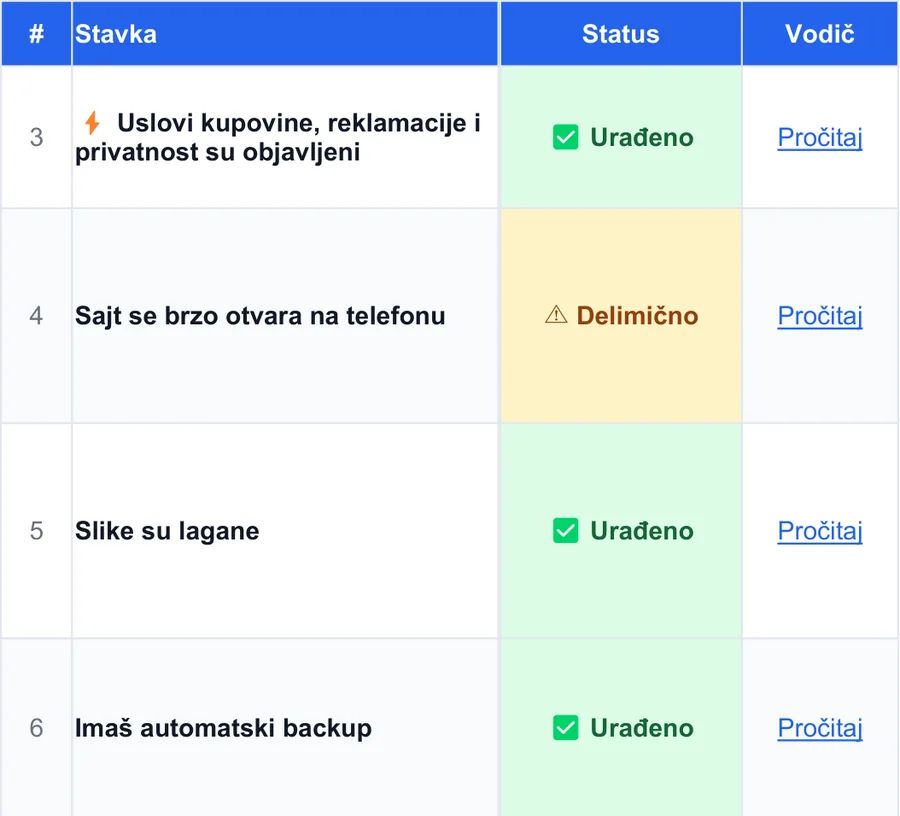
The Website tab in the spreadsheet: items with priority, status and a link to the guide
This is what every organ looks like: why it matters, how to check, how to fix it, and a step-by-step guide.

Not running ads? You skip those checks and they don't count toward your results.

What you get at the end

Results. In black and white.

The spreadsheet adds up everything you checked and tells you three things: how healthy your store is, which organ needs the most attention and where to start.

You came in without results. You leave with them. No “maybe”, no “it depends on the algorithm”.

Next to every item that isn't right, it also tells you how to fix it. Some you fix yourself in five minutes. Some need a developer, but at least you know exactly what to tell them.

(And you stop nodding along to “it all works”.)

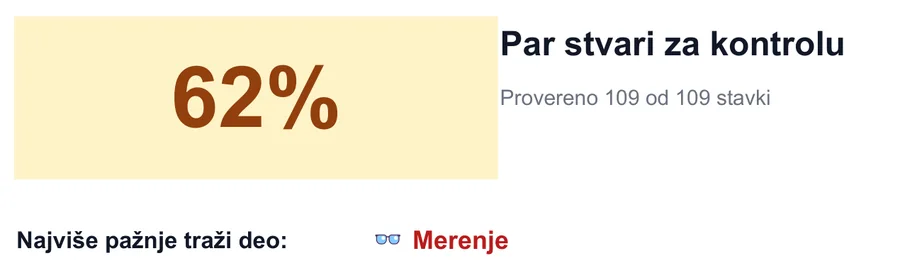
Your results in the spreadsheet: 62 percent, A few things to watch, score by section, Tracking needs the most attention
Sample results. The spreadsheet calculates them as you go through the items.

How it works

Three steps, an hour or two.

the spreadsheet remembers where you left off

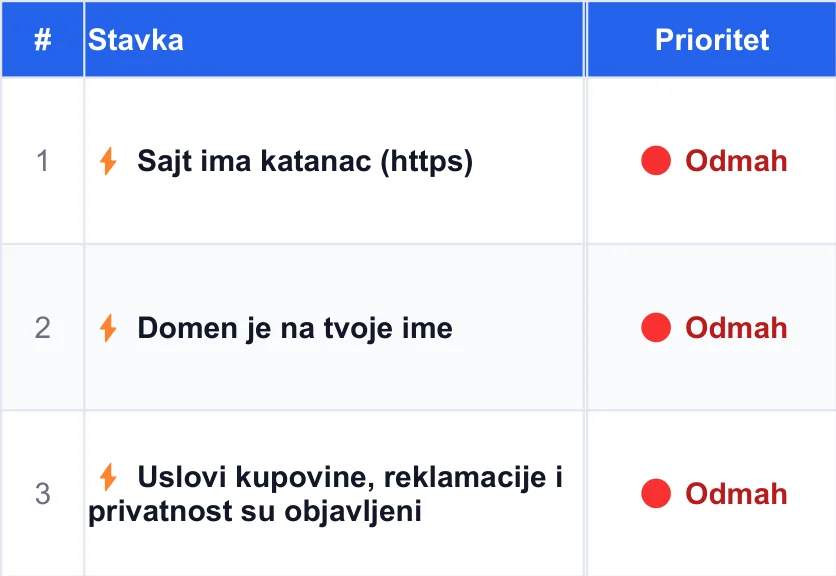
  1. Start with the lightning bolts ⚡

    These are items you fix in a few minutes, and that's usually where the biggest money is.

    The first items in the spreadsheet, marked with a lightning bolt and Now priority
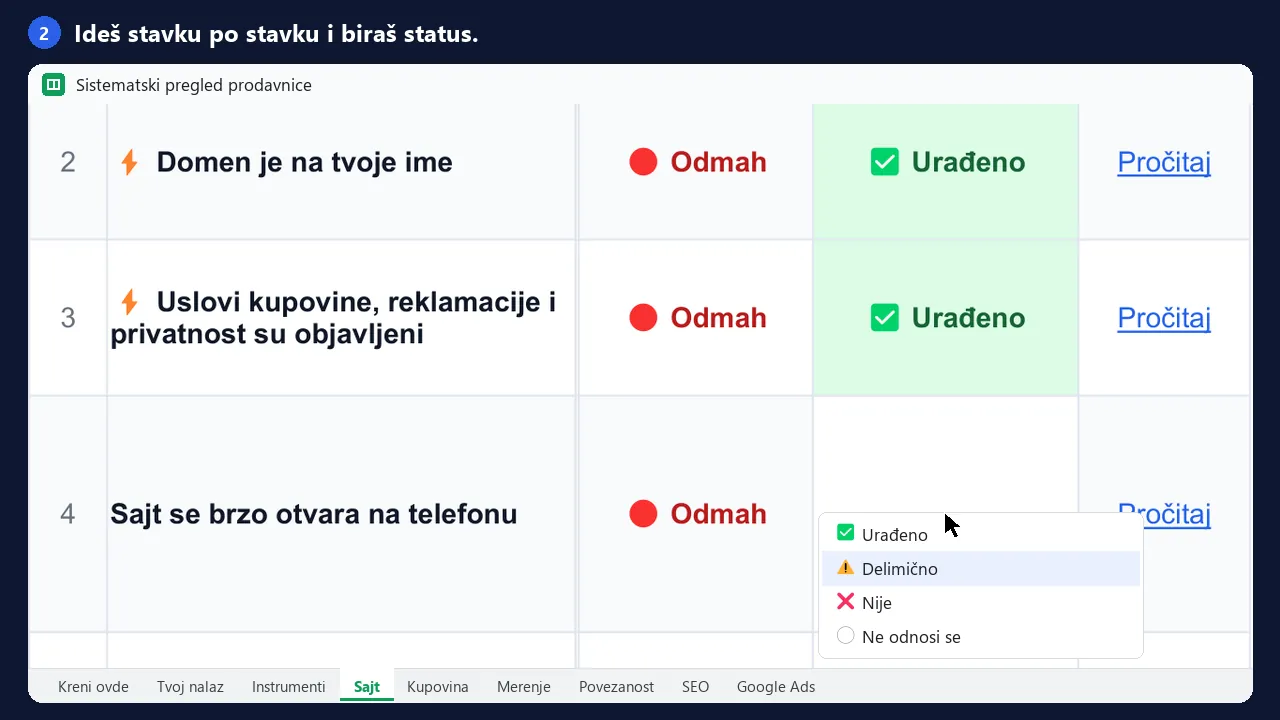
  2. Go organ by organ

    Read, look, pick: done, partly or not yet.

    The Status column with Done, Partly or Not yet, and a link to the guide
  3. Open your results

    See where you stand and what's next.

    Results in the spreadsheet: the percentage and the section that needs the most attention

It all takes an hour or two. You don't have to do it in one go, the spreadsheet remembers where you left off.

Why this way

Why a “checkup”

Remember the eye test for your driver's license?

You walk in relaxed. Just a formality, you think. Then they point you to that chart with the letters.

“Read the third line, please.”

You squint. “E… F… or is that a P?”

And that's where it stops. You know how to drive. You just can't see well, and you didn't even know it. No license until you put on glasses.

Not fun. But better to hear it there than to find out on your own, on a winding mountain road at night, when the sign ahead is a blurry smudge.

Your store is the same.

A lot of the stores we see are driving without glasses. Ads are running, money is going out, everything seems normal. But the owner can't see where customers come from, which ad brings in money and which one just spends it. They're driving from memory.

And nobody notices, because everything “works”.

That's why we called it a checkup. You don't go for a checkup because something hurts. You go so it doesn't start hurting. And to find out in time, while glasses are still cheaper than surgery.

Example from a real account

Let me show you what “appetite” means.

Google Ads report: out of about $1,325, the Google Display Network spent about $620 on 10,143 clicks, with 0 conversions
About $1,325 total for one month. The campaign name is blurred.

This is one store's account. In one month, about $1,325 went to Google Ads.

The owner wanted something simple. When someone types what he sells into Google, his ad shows up.

But one checkbox was left on in the settings. That checkbox tells Google: “feel free to show my ad as a banner too, in games and on websites”. It's on as soon as you create the campaign. If you don't uncheck it yourself, it stays on.

And Google did as it was told.

About $620 went to banners.

In mobile games like Candy Crush and on sites that only exist to show ads.

You know what that looks like? Someone on the bus (or on the toilet, no judgment) is playing level forty of the candy game. Your ad pops up. They try to close it, miss the little X and tap it.

You just paid for that click.

There. The checkup already saved you some money, and you haven't even bought it.

And look at the image again. The ads on search itself don't have a single purchase either. Either that store sells nothing, or it can't see that it sells. That's the eye test. Without it, you don't even know what to turn off.

That's one item. The checkup has plenty more, and most of them work the same way: nothing hurts, but it keeps spending.

Same thing, on Meta

We caught it in our own campaign too.

When we launched ads for this checkup on Facebook and Instagram, Meta sent part of the budget to Audience Network on its own. Those are ads inside other people's apps and games, same story as Google's banners.

In the first two days, 41% of the budget and 70% of the clicks went there. Not a single add to cart. People from those clicks stayed on the page for about 7 seconds.

We turned it off as soon as we saw the numbers. You can do it today.

Hall of Fame

Get into the Hall of Fame

Be part of the story: the first stores that went through the checkup and got themselves fixed.

Do the checkup, fix what your results show and tell us what changed.

With your permission, your store goes up here: name, link and what you fixed. You get a recommendation and a link to your site, and others see this can really be fixed.

Apply for the Hall of Fame
  1. Go through your list.Item by item, at your own pace.
  2. Fix what your results show.Whatever blocks sales comes first.
  3. Send us your before and after.With your permission, you go up on the board.

Your results could be better or worse. That's what the guarantee is for.

Price

How much does it cost?

Here's how I look at it. In one month, that store paid about $620 for clicks from games. That's the price of one checkbox nobody looked at.

An agency charges from $500 for an account audit. And they only look at the ads.

The checkup costs $39. Once. And you check everything: site, checkout, tracking and ads.

One checkbox, one month
about $620
Agency account audit
$500 and up
The checkup, everything at once
$39

Store Checkup

$39one-time payment

  • A checkup of all eight organs of your store, in one Google Sheet
  • For every item: why it matters, where to look and how to fix it
  • Lightning bolts ⚡ at the top: items you fix in five minutes
  • Results that calculate themselves and tell you where to start
  • Works on your phone too, no Excel needed

Pay by card through a secure Lemon Squeezy page. Your bank may show the amount in your local currency.

Get your checkup · $39

The link to your copy of the spreadsheet arrives by email right away.

If your store is healthy as a horse, we give you your money back. Do the checkup. If you don't find anything that needs fixing, email us and we refund the full amount. No questions asked. And honestly, we'll congratulate you.

Who wrote this

The same list we go through with every new store.

I'm Steph. I run Google and Meta ads, Google since 2016, for stores in Serbia and abroad. John builds websites and fixes all the stuff you don't see but that has to work.

This checkup is the list we go through when a new store reaches out. Same order, same checks. We just wrote it so you can do it yourself, without us.

StephGoogle and Meta ads
JohnWebsites and everything you don't see

It's for you

if you have an online store, run it yourself or with one or two people, someone else built your site, and you'd like to know what's going on inside it.

It's not for you

if you don't have a site yet, or you already have people who check this regularly.

Before you buy

If you don't have an hour or two for this this week, don't buy it.

Seriously. The spreadsheet does nothing until you open it. It's not a virtual pet, it won't beep at you on its own.

And here's what I see with store owners. If you don't have two hours now, you won't have them next month either. Or before Black Friday. Or when your ads start spending twice as much. “I don't have time” never goes away on its own.

And the things you put off are exactly the ones that make you money months later: seeing what works, keeping your ads out of games, getting customers to come back.

It's like the dentist: by the time it hurts, it's a root canal.

Have an hour or two? Start today. No time, but you have the budget? We'll fix it for you.

Decision

Now you have three options.

I know which one I'd pick. But I'm biased.

  1. Do nothing.

    Ads keep running, money keeps going out, and you still don't know what's working. A month from now you're where you are today, just with less money.

  2. Guess on your own.

    Google things, watch YouTube tutorials, change stuff blindly and hope for the best. That works too. It takes a while.

  3. Do the checkup.

    An hour or two, $39, and you have your results. In black and white.

Get your checkup · $39

Questions

Before you ask

Don't see your question? Email us, we usually reply within an hour or two.

I'm not a tech person. Will I manage?

If you can post on Instagram, you will. Every item tells you where to look and what you should see. And if there's something you can't fix yourself, at least you know what to ask your developer for.

I already have an agency. Why do I need this?

You're not checking your agency. You're checking your store. Like a second opinion from a doctor. A good agency won't mind.

Everything works for me.

Maybe. Then we give you your money back. But that Candy Crush store “worked” too.

How long does it take?

An hour or two. Start with the lightning bolts ⚡, that's the first half hour. You don't have to do it all at once.

I don't run ads. Does it still make sense?

It does, more than ever. You fix the basics before you spend your first dollar on ads. You skip the ad sections.

What do I get after I pay?

You get a link by email. Click it, and Google makes your own copy of the spreadsheet. All you need is a Google account, the same one you use for Gmail.

Will you call me afterwards and try to sell me something?

No. If you get stuck, you can book a call yourself. If not, the spreadsheet is yours and nobody bugs you.

I don't have an online store, I offer services. Is this for me?

This checkup is built for online stores. For contractors, salons, clinics and repair shops we have a separate version. See the Service Business Checkup →

The checkup doesn't hurt. It takes an hour or two.

Get your checkup · $39

Offer services instead of selling products? The version for you →

Steph

P.S. If you scrolled straight to the bottom (we all do), here's the whole story in three sentences. The biggest problems in a store don't hurt, they just cost money. In an hour or two, the Store Checkup tells you what's healthy and what isn't. It costs $39, and if your results come back clean, we refund you.

P.P.S. Go into Google Ads and check that checkbox from the example. It takes 30 seconds and costs you nothing. If it was on, you know where your next $39 is best spent.

Checkup · $39Clean results, money back
Start